Sunday, 1 December 2013

Widgets

Widgets could be understood as "mini apps".
  • Widget types
    • Information widgets
      • To display a few crucial information elements that are important to a user and track how that information changes over time.
      • e.g. weather widgets, clock widgets or sports score trackers.
      • Interaction: touching information widgets launches the associated app and opens a detail view.
    • Collection widgets
      • To display multitude elements of the same type, which are collected from an app. Collection widgets can scroll vertically.
      • e.g. a collection of pictures, articles, emails/messages.
      • Interaction: browsing the collection, and opening an element of the collection to its detail view.
    • Control widgets (remote controls)
      • To display often used functions that the user can trigger right from the home screen.
      • e.g. music app widgets
      • Interaction: may or may not progress to an associated detail view depending on if the control widget's function generated a data set, such as in the case of a search widget.
    • Hybrid widgets
      • Many widgets in reality are hybrids that combine elements of different types.
      • e.g. A music player widget keeps the user informed about what track is currently playing. It essentially combines a control widget with elements of an information widget type.
  • Widget limitations
    • Gestures
      • Touch
      • Vertical swipe
    • Some of the UI building blocks that rely on restricted gestures are not available for widgets.
  • Design guideline
    • Widget content(內容)
      • The widget is the information "snack" while the app is the "meal."
      • As a bottom line, always make sure that your app shows more detail about an information item than what the widget already displays.
    • Widget navigation(導覽)
      • Besides the pure information content, providing navigation links to frequently used areas of your app.
      • Generate functions and open application at top level
    • Widget resizing(尺寸)
      • Planning a resize strategy for your widget depends on the type of widget you're creating.
      • List or grid-based collection widgets are usually straightforward while information widgets require hands-on planning to make all content fit within a given size.
    • Layout considerations(版面)
      • Be flexible and accommodated
      • Planning your widget resizing strategy across "size buckets" rather than variable grid dimensions.
    • Widget configuration(設置)
      • Keep the widget configuration light and don't present more than 2-3 configuration elements.
      • Use dialog-style instead of full-screen activities and retain the user's context of place.
      • Android widgets do not show a "Setup" or "Configuration" button.
Checklist
  • Focus on small portions of glanceable information on your widget. Expand on the information in your app.
  • Choose the right widget type for your purpose.
  • For resizable widgets, plan how the content for your widget should adapt to different sizes.
  • Make your widget orientation and device independent by ensuring that the layout is capable of stretching and contracting.

Friday, 29 November 2013

App Structure

  • Top Level views
    • The layout should be an equally rewarding experience for new and frequent visitors alike.
      "What are my typical users most likely going to want to do in my app?"
    • Put content forward: Choose layouts that are visually engaging and appropriate for the data type and screen size.
    • Set up action bars for consistent navigation and actions:
      • Use the action bar to display your app's icon or title
      • Navigation supports switching multiple views
        • Fixed tabs: views switching frequently, limited numbers, aware of the alternate views
        • Spinners (drop-down menu): views switching between the same data set or those of the same type
        • Navigation drawers (slide-out menu): suitable for complex apps, a large number of top-level views, direct access
      • Consider making the content creation accessible right from the top level.
      • Include the Search action in the action bar
  • Categories views
    • Use tabs to combine category selection and data display: Scrolling tabs for closely related data, but no more than 5-7 tabs; fixed tabs for unrelated data.
    • Allow cutting through hierarchies
    • Acting upon multiple data items
  • Detail/edit view
    • Make navigation between detail views efficient, e.g. swipe views, thumbnail view controls

Checklist
  • Find ways to display useful content on your start screen.
  • Use action bars to provide consistent navigation.
  • Keep your hierarchies shallow by using horizontal navigation and shortcuts.
  • Use multi-select to allow the user to act on collections of data.
  • Allow for quick navigation between detail items with swipe views.

Thursday, 18 April 2013

Responsive typography

Interaction design is engineering: it's not about finding the perfect design, it's finding the best compromise, which means it requires you to think about compromises between visual design and technology from the very beginning.
The content matters
  • The content and the language used has a big impact on how our typography will work. Oliver Reichenstein also states that different font sizes and contents have different influences on our ways of writing, editing and reading.
  • Typography for the web should design inside the browser with the project's real content.

Typeface
  • Choose the typeface fits the right tone (based on the real content) of the website.
  • The size of the body text depends on reading distance, and reading distance varies depending on the device used or held.

Line height
  • 140% is a good benchmark for line height but it also depends on the typeface you use.
  • Use tighter leading in a narrower paragraph, and looser in a wider one.
To take reading distance into account, the smaller the screen size it is, the smaller the type size and tighter the line height should adopt, so that the perceived size is more or less the same as on all devices.

Additional tips
  • Always use non-breaking spaces( ) in expressions in which figures and abbreviations are separated by a space (e.g. 20 kg, 4:00 pm).
  • Try to keep the line length between 45-75 characters per line.

Useful tools

Source: Responsive Typography: The Basics by Oliver Reichenstein, Prototyping Responsive Typography by Viljami Salminen.

Tuesday, 9 April 2013

The UX design process and methods

Research and understanding
  1. Define the problem
  2. Collect the facts of business requirements and user needs through:
  3. Produce useful documents to help with design thinking
Design
  1. Generate dozens of ideas or paper interfaces
  2. Develop interactive paper prototype
  3. Test the prototypes quickly, iterate on the ones that have value, evaluate and combine the best parts into a converged solution: open card sorting, tree test, trigger word elicitation, swap sort and online card sorting, cognitive walkthrough, word list.
  4. Electronic prototype: using one tool throughout.
  5. Iterative process
Evaluation throughout the design process
  1. Qualitative and quantitative data
    Collect qualitative data to identify usability problems, then use quantitative survey to make predictions and measure the usability of a system
  2. Word list
    Can be both qualitative (circle words from a checklist of adjectives) and quantitative (Use word cloud or count the positive/negative comments).
  3. Card sorting
    Tree test, function familiarity test
  4. Cognitive walkthrough
    A happy path and 4 questions interview to identify usability problems.
  5. Usability testing software: Morae, Silverback
  6. Questionnaires: AttrakDiff
  7. Create and present a clear series of next steps

Sunday, 31 March 2013

Build a responsive site


Image source: Responsive workflow, but note that the order might not be this linear in reality.
Responsive typography and units
  • Responsive typography
  • Text design: produce a page that contains all the major HTML elements and a basic CSS style, so that everything will be covered.
  • Have three distinct heading styles, rather than ten with subtle variation.
  • Start with the <body> element
    body {
     font: 100%/1.5 serif; /* equates to 16px in most browsers */
     padding: 1em 20%; /* stop content from bumping up against the edges of the browser */
    }
  • The measurements, em & %, are relative to computed font size of its parent.
    Use ems to size typography and vertical measurements,
    and percentages for layout and horizontal measurements.
  • target / context = result
    h1 {
     font-size: 1.75em; /* 28 / 16 = 1.75 */
     line-height:1.1428; /* 32 / 28 = 1.1428 */
     /* Don’t need to declare a unit for the line-height property. */
    }
Responsive images and video
Media queries
  • Design various breakpoints: think first in terms of device classes, not specific devices. I prefer to let the actual content and images in the browser at the same time as making adjustments in response to the screen size. 
  • Add <meta name="viewport" content="initial-scale=1.0, width=device-width"/> between <head> tag. This tells browsers that a website shouldn’t be squashed down to fit on a small screen, and that the width of the browser window should be treated the same as the overall device width.
  • Adopt em-based media queries. Not only will our website adapt based on the size of the viewport, but the size of the font too.
  • To make media queries work for ie, here are the solutions:
Finally,
Test multiple devices, network speeds and in the wild.

(Resources: Build a responsive site in a week:
Part 1, Part 2 (typography and grids), Part 3 (images and video), Part 4 (media queries), Part 5, Responsive workflow)

Monday, 11 March 2013

The powerful cards

Remember: card sorting is not a user interface design method, but a knowledge elicitation exercise to discover users' mental models. It has to make users work harder and really think about how they'd approach the concepts written on the cards.
- Card Sorting: Pushing Users Beyond Terminology Matches
Exploratory card sorting
  • Purpose: to find out how your users classify the information in your domain.
  • Steps of open card sorting:
    1. 30-100 cards (with a title and a short description).
    2. Ask around 15 users to sort the cards into groups.
    3. Users give each group a description of what makes the group a group.
    4. Analyse the data. The terms people use to describe the groups will become the proto-headings of the navigation structure.
A title of the function
A short description
x 30-100 cards
Users: sort the cards into groups
Users give each group a description
Tree test
  • Purpose: to check if people can actually find stuff in your navigation structure.
  • Steps:
    1. 10-20 task cards (with a short description of a likely goal/task that the web site supports)
    2. Prepare a set of group headings, derived from an open card sort.
    3. Write down the sub-groups on the back of each card.
    4. Ask users to pick the group card and then the sub-group card while given the task cards.
"Find an exercise bike"
x 10-20 cards
+
(front)
Sports & Leisure
(back)
Fitness
(back)
Camping & Hiking
(back)
Cycling
Users: pick the group card and then the sub-group card
Trigger word elicitation
  • Purpose: to identify the words or phrases that will encourage users to click on links.
  • Steps:
    1. 10-20 task cards (with a short description of a likely goal/task that the web site supports)
    2. Ask users the words or phrases they would expect to find on a web site that supported that task.
Web broad
  • Purpose: to find out where users expect to find your functions.
Function familiarity test
  • Purpose: to gauge how often people use functions within your application, or to measure levels of understanding.
  • Steps:
    1. Cards contain a title of the function and a short description.
    2. Ask users to sort the cards into three piles: functions I use frequently; functions I use sometimes; and functions I rarely or never use.
    3. Give points and add up the scores derived from all participants to identify the most used functions in your interface.
A title of a function
A short description
sort the cards into three piles
Functions I use frequently
5 points
Functions I use sometimes
2 points
Functions I rarely or never use
0 points
Swap sort
  • Purpose: to find out the most important functions, features or tasks within your interface. This information would help you know how to priortise content.
  • Steps:
    1. Cards contain a title of the function, feature or task and a short description of it.
    2. Ask users to pick the 10 most important cards of them.
    3. Ask users to place the 10 card vertically and rank them in descending order of importance.
    4. Give points from 10 to 1 and add up the scores derived form all participants to identify the most important functions in your interface.

(Source: Card Games for Information Architects by David Travis)

Friday, 8 March 2013

Vision comes first

A user experience vision gives
  • direction, where the design priorities lie.
  • challenge inspires and excites people; brings inspirational sparkles.
  • focus
How to create a user experience vision - "design the box" or "working backwards"
  • Design the packaging of the "product" and agree on the most important message.
  • After 30 minutes or so, each team presents their box to the larger group for 2 minutes.
  • The purpose is to discuss the findings and reach a consensus.
How to refine the vision and present it to non-designers
  • Tell a story: personas and scenarios, which captures the winning idea.
  • Draw a picture: storyboards

(Source: Why you need a user experience vision (and how to create and publicise it) by David Travis)

Tuesday, 5 March 2013

Paper prototyping should never be dismissed

The worst possible way to design a web site is to have five smart people in a room drinking lattes and discussing branding. - Gerry McGovern
Paper prototyping is the method facilitating divergent design thinking, supporting iterative design, and most importantly, testing with users not designers. That is, in the initial phase of design, you should generate dozens of completely different ideas, develop interactive paper prototypes, test them quickly, evaluate and combine the best parts into a converged solution.

According to David Travisa, a paper prototype is a sketch - a quick visualisation of your ideas. He also gave an example illustrating its simplicity and artlessness.

I think the fineness depends on the objectives - to quickly generate ideas. It can be a sketch. To test with users, it should contain as many details as possible, and not be too messy to be understood.

Paper prototyping helper kit is an alternative provided by UserFocus, which supports 'cut and paste' numerously. Together with PowerPoint or Keynote to chain the screens, Morae can then be used to record usability testing sessions.

(Source: 7 myths about paper prototyping by David Travis)

Wednesday, 20 February 2013

The details of personas

It is the specificity and detail of personas that gives them their value.
- Alan Cooper
A real and useful persona should answer each of the following questions with a 'Yes'.
P-E-R-S-O-N-A: Primary research, Empathy, Realistic, Singular, Objectives, Number, Applicable.
  • Primary research: Is the persona based on contextual interviews with real customers?
    Every key element of your persona should be traceable to observations and interviews in the real sites.
  • Empathy: Does the persona evoke empathy by including a name, a photograph and a product-relevant narrative?
    A good persona has an engaging story to help designers relate to the persona.
  • Realistic: Does the persona appear realistic to people who deal with customers day-to-day?
    Send your persona to front-line staff, customer support and the sales team, to check if they can recognise someone and believe in the persona.
  • Singular: Is each persona unique, having little in common with other personas?
    Each of the personas in your set should comprise a unique cluster of behaviours, motivations and goals.
  • Objectives: Does the persona include product-relevant right-level goals and include a quotation stating the key goal?
    Pitch yours goals at the right level by putting the most important goal in a brief quotation. Capture the user's goal and provides an appropriate design target at the same time.
  • Number: Is the number of personas small enough for the design team to remember the name of each one, with one of the personas identified as primary?
    A Forrester survey of consultancies showed that firms created around four personas per project (and these were based on an average of 21 user interviews per project).
  • Applicable: Can the development team use the persona as a practical tool to make design decisions?
    Your persona should focus on behaviours, motivations and goals rather than demographics.

角色模型需聚焦於產品使用行為、動機與目標,並結合照片與姓名,塑造成一個個獨特且引人入勝的情境劇本。將當前的目標轉化為簡短的「引言」,以兼顧描繪使用者與強調設計重點的目的。角色模型中所有的元素皆需來自真實情境的訪談,21個訪談內容約可建立4組角色模型,並擇一作為主要的模型。完成之後,需將模型交由與使用者互動的第一線人員,確認其內容的可信度。

(Source: How to create personas your design team will believe in by David Travis)

Rethinking focus groups

Focus groups used for the purpose of idea generation, rather than for market verification, can be particularly effective.
Focus group are quick and easy to design and use, which is also complemented by site visits.

To access participants' genuine thoughts and beliefs, we should be aware that in most instances people are unaware of the factors that influence their response. They are not able to introspect themselves.

Therefore, we can use indirect methods of tapping into cognition and behaviour. The key is to try and actually bypass the direct voice of the consumer, and pay attention to what people do in the actual field.

(Source: Is Consumer Research Losing Its Focus? by Philip Hodgson)

Tuesday, 19 February 2013

Tips for interviewers

Good interviewers build rapport.
Great interviewers realise that rapport involves more than meeting and greeting.
  • Make a mental and emotional connection. It's a continual process of building a relationship based on trust and understanding.

Good interviewers listen.
Great interviewers realise that listening involves more than using our ears.
  • Begin active listening by making a decision to become genuinely interested in what the interviewee thinks, feels and wants.
  • Show interviewees that you are really attending to what they are saying through an open posture and eye contact.
  • Listen for the meaning behind the words.
  • Demonstrate you've listened to your interviewee by showing you are finding what they are saying interesting and encouraging the speaker to tell you more.
  • 首先,給自己一個承諾:要真誠看待受訪者的想法、感受和期待。
  • 透過肢體語言和眼神接觸,讓受訪者知道你在專注於他們所說內容。
  • 傾聽話語背後的意義。
  • 最後將所聽到與理解的內容,重述給受訪者聽,強調某些有趣可在深入探討的議題,以鼓勵受訪者分享更多。
    一方面暫緩受訪者被連續的問題轟炸,讓他們知道你懂;另一方面也可讓雙方釐清並確認搜集到的資訊無誤。

Good interviewers are sympathetic.
Great interviewers are empathic.
  • Make people feel understood and valued.
  • Use "empathic reflections" to give the speaker a verbal summary without passing judgment.
  • "You feel...because..."
  • "I'm picking up that you..."
  • "So, from where you sit..."
  • "It seems as if..."
  • "I get the feeling..."
  • "What I hear you saying is..."

Good interviewers are aware they might be biased.
Great interviewers use their self-awareness to uncover blocks to listening.
  • Genuinely believe there's no right or wrong answer.
  • Do not judge what's being said.
  • Be aware of seeking confirmation, anxious or defensive reaction. Remember that it doesn't matter what you like, because you are not the user.
  • Be non-judgemental towards both opinions and people.
  • Ask yourself, "What am I thinking and feeling right now in reaction to this person?"
  • 打從心底相信受訪者的答案沒有對與錯之分。
  • 不要評論與批評受訪者所說的話。
  • 覺察自己尋求認同、焦慮或反抗的反應。
  • 對於人與觀念都要抱持著不妄加評論的態度。
  • 時常問自己,「和此人互動時,我心裡想什麼、感受到什麼?」

Good interviewers note inconsistencies between what someone says and what they observe.
Great interviewers investigate these inconsistencies.
  • Offer a gentle challenge when you see a discrepancy between what interviewees say and what they do. It may be a "blind spot".
  • A good challenge is specific and non-accusatory. The purpose of a challenge is to stimulate discussion and help both of you understand more about the situation. 
  • "You say you follow the process yet I noticed you seem to do things differently at two points."
  • Sandwich: positive feedback + "I'm finding our meeting really interesting," + the challenge + "If we can discuss that, you'll help me even more".
  • 點出受訪者言行不一的情況,深入調查。
  • 一個好的試探應該是明確且委婉方式,目的在於刺激討論,幫助彼此更加了解。
  • 亦可先做正向總結,再提出試探性的問題。

(Source: Site visit interviews: from good to great by Anna-Gret Higgins)

Interview tips: how to start and conduct interviews in a site visit

Visiting your customers at their place of work helps you really understand the needs, motivations and goals of your users.
Create a focus question
The focus question helps you concentrate on the observations that matter. Develop it by working with the project team and use a sticky note activity.

  1. Give the project team 5 minutes to brainstorm all of the questions they would like to ask their users.
  2. Tell them to write each question on a sticky note, one question per sticky note.
  3. Place all the sticky notes on the wall and first arrange the questions into groups.
  4. Vote for the most important group. The group of questions then becomes the articulation of the focus question.
  1. 給專案組員五分鐘的時間,腦力激盪他們想問使用者的問題。
  2. 請他們將問題寫在立貼上,每張紙一個問題。
  3. 將立貼貼在牆上,並將所有問題歸類成組(約五分鐘)。
  4. 選出最重要的一類。其中的問題即是需聚焦的問題。

Start the interview
"I am going to research [activity] so that I can [design a system]."
  • Audio record the sessions
    Recordings can catch comments, phrases and some of the technical language, as well as Intonation. Video record is feasible in large, relatively anonymous spaces. Audio recording on the other hand is usually possible in most environments.
    • "I'll be taking notes during our interview, but if it's OK with you I'd also like to record the sessions as I can't take notes quickly enough. The recording is just for my purposes and anything you tell me will be kept confidential."
    • Pause the recording if sensitive data gets discussed. Change the participant's name when getting the transcriptions.
    • Reviewing the transcript in depth is the most important analysis step you'll make.
  • Take photographs of the environment
    To recall key elements of the environment.It's easier to ask permission if you wait until the end of the session and give the partipant a gift before asking (such as some chocolates).
    Take three kinds of photograph:
    • Pictures that show the overall context.
    • Pictures that show the participant alongside other people and objects in the environment.
    • Close-up photographs of the participant interacting with specific objects in his or her environment.
    拍照的重點:
    • 整體環境,包括辦公室內部與建築外部空間。
    • 受訪者和其他人與物在環境中的相對位置。
    • 受訪者與特定物件互動的近照。
  • Take great notes.
    Make sure that your note taking doesn't disrupt your relationship with the participant and miss observations.
    1. Take around 4 pages of A5 notes for each 30-minute observation.
    2. Reserve the first page of notes for any abbreviations and jargon that you hear: this quickly builds into a useful glossary.
    3. In addition to a few quotes that really strikes you, you should jot down ideas, key themes as they start to form, and also questions that you want to ask later in the discussion.
    4. 'AEIOU' method: Activities, Environments, Interactions, Objects and Users.
    1. 30分鐘的訪談中,記錄約4頁A5的筆記
    2. 第一頁預留給聽到的縮寫和專業用語(之後可以拿來做成詞彙索引)。
    3. 記錄一些最有印象的話,受訪者的點子、談話中形成的主題、以及之後要問受訪者的問題。
    4. 如果不知道要記錄什麼,可以記錄從事的活動、環境、互動狀況、物件和使用者本身。
  • Write up a short summary of their observation immediately.
    Schedule around 15 minutes after each participant to summarise what they have learnt. Use Contextual Interview form.


'AEIOU' method

Activities are goal directed sets of actions — things that people want to accomplish.
What primary activities do users need to perform to meet their goals? What do users mention first?
Which action words (verbs) do they use?

Environments include the entire arena where activities take place. Take photographs or make a sketch of the environment where the action happens.

Interactions are the exchanges between a person and someone or something else, and are the building blocks of activities.
What are the intermediate steps or tasks in the process?
What steps does the user enjoy most?
What are the user’s pet peeves?
Who reviews or authorises the work?

Objects are the artifacts that people interact with, as well as the building blocks of the environment.
What physical items does the participant interact with?
What software does the participant use?

Users are the people providing the behaviours, preferences and needs.
What are the participant’s goals, attitudes and motivations?
What are the participant’s capabilities with the product domain and with technology?
What education and training do participants have?

(Source: The 5 habits of highly effective field researchers by David Travis)

Monday, 18 February 2013

Tips for usability testing: the word list

Usability as:
Extent to which a product can be used by specified users to achieve specified goals with effectiveness, efficiency and satisfaction in a specified context of use. (from ISO 9241-11)
The issues to be considered while designing a good questionnaire:
  • Avoid positively-phrased statements (acquiescence bias).
  • Reliability (信度): consistency and repeatability.
  • Validity (效度): accuracy.

Other than questionnaires, we can adopt the alternative of the Microsoft Desirability Toolkit to control the tendency for the participants to rate their experience better than it actually was.

  1. Prepare a simple paper checklist of adjectives. For a particular study, replace some of the words with others that may be more relevant. Here is the list developed by Userfocus.
  2. Ask people to read through the words and select as many as they like that they think apply to the interface.
  3. Ask them to circle just 5 adjectives.
  4. The selected adjectives then became the basis of a post-test guided interview.

  1. 根據研究目的,寫出一份內容適合的形容詞列表(參考英文版)。亦可加入品牌/產品形象用字。
  2. 請使用者瀏覽並選擇他們認為符合該產品/介面的字詞。
  3. 請使用者從他們選出來的字詞中,再圈選出五個。
  4. 這五個字詞是測後訪談的討論重點。先前加入的品牌/產品形象用字,此時可一一和使用者討論他們選/不選、認同/反對的原因。
    "I see that one of the cards you selected was 'Sophisticated'. Tell me what was behind your choice of that word."

This approach is ideal as a qualitative approach to guide an interview. You can also derive metrics from these data via word cloud (try Wordle) and verbal protocol analysis (to count the percentage of positive and negative comments.)

Also apply randomisation or counterbalancing approach to generate the word list to prevent order effects.

(Source: Measuring satisfaction: Beyond the usability questionnaire by David Travis.)

Red route usability: how to define the cores

Make a decision to buy is difficult.
Red routes could and should achieve:
  • Improve speed and effectiveness.
  • Describe both frequent and critical activities.
    e.g. search: frequent; editing personal details: infrequent but critical.
  • Reflect key business objectives.
  • Reflect key customer objectives.
    Visitors to your site will have their own goals that your site needs to support.
Five characteristics of red routes:
  • Be complete activities, not simple tasks.
  • Imply a success look and an obvious measure of accomplishment.
  • Must be "portable" to competitor web sites.
  • Focus on goals not procedural steps.
  • Be accurate and realistic.
How to define red routes:
  • Carry out some research with customers.
  • Have a look at a month's worth of search queries.
  • Speak to the people who deal with customers.
  • Listen into customer calls. Survey and classify the calls.
  • Look at what your competitors are doing.

(Source: Red route usability: The key user journeys with your web site by David Travis)

Friday, 8 February 2013

Quantitative and objective

If you know a thing only qualitatively, you know it no more than vaguely.
Deep understanding, not broad coverage, is the strength of qualitative research.
Quantitative (量化) vs Qualitative (質化) 
  • The way to distinguish between quantitative and qualitative data is to focus on the status of a single observation.
  • Sample size does not determine whether data are quantitative or qualitative.
  • Quantitative and qualitative data can be, and often are, collected in the same study.
Quantitative:
  • Rating scales are not designed to capture opinions, per se, but rather are designed to capture estimations of magnitude. Data from Likert scales and continuous (e.g. 1-10) rating scales are quantitative.
  • 可以比較大小
Qualitative:
  • Qualitative data can be analyzed statistically, but cannot be compared in terms of magnitude.
  • 無法比較大小
The comparison of quantitative and qualitative
QuantitativeQualitative
any single observation is a number that represents an amount or a countany single observation is a word, or a sentence, or a description that represents a category then the data
requires some precise measuring instrumentitself is the measuring instrument
usually during summative testing when measuring the usability of a systemusually during formative testing when identifying usability problems, such as cognitive walkthrough
attempting to prove somethingattempting to understand something

Subjective (主觀) vs Objective (客觀)
  • Subjective data result from an individual's personal opinion or judgement and not from some external measure. Objective data are 'external to the mind' and concern facts that actually exist.
  • Both quantitative and qualitative data can be objective or subjective.
Examples of qualitative and quantitative data
Quantitative Qualitative
Objective "The chip speed of my computer is 2 GHz" "Yes, I own a computer"
Subjective "On a scale of 1-10, my computer scores 7 in terms of its ease of use" "I think computers are too expensive"

The discipline of usability is concerned with prediction, not opinions. Misunderstanding and misusing the above terms can reduce the value of a usability study, leading to wrong decisions. The consequences are a waste of company money and reduce people's confidence in what usability studies can deliver.

(Source: Usability Test Data by Philip Hodgson)

From a happy path to a cognitive walkthrough evaluation

The cognitive walkthrough is an ideal way to identify problems that users will have when they first use an interface... by exploration rather than by reading the manual.
Although a usability problem has been identified and is recorded, redesign suggestions are not made at this point.
Both cognitive walkthrough and heuristic approach are the methods of identifying usability problems. When I first came across these theories, I like the latter more for the reason that the results extracted from the former are subjective and sometimes abstract. Now I prefer cognitive walkthrough as its principle is based on asking questions to distil usability problems from users' experiences, while heuristic evaluation seems like guidelines for the designers and analysts.

The cognitive walkthrough involves the happy path and 4 questions to be asked before, during and after each step in the happy path.

the happy path
  • A complete, written list of the actions/steps needed to complete the task with the interface — the ‘happy path’.
  • If the happy path was too complicated, you've found a serious usability problem already. It would not make users happy at all.

4 questions
  • Will the customer realistically be trying to do this action?
    If the participants were trying to do something deliberately and inconsistent with their inital intention, the design may not be based on users' background knowledge and expect some unnatural actions from user.
  • Is the control for the action visible?
  • Is there a strong link between the control and the action?
    This question highlights problems with ambiguous or technical terms, or with other controls that looks like a better choice.
  • Is feedback appropriate and does the action prompt users to make progress towards the next step in the task?
    The feedback might be missing, or easy to miss, or too brief, poorly worded, inappropriate or ambiguous.

or Streamlined cognitive walkthrough, a cut-down version not documenting problem-free steps and combining the four original questions into two:
  • Will people know what to do at each step?
  • If people do the right thing, will they know that they did the right thing, and are making progress towards their goal?

(Source:  The 4 questions to ask in a cognitive walkthrough by David Travis, Designing Interactive Systems by David Benyon)

Wednesday, 30 January 2013

Start to do UX researches

Facts and evidence, not guesswork and assumptions.

  1. Understand the problem to be solved
    • The cost of focusing too early on design solutions is that you easily lose sight of the problem you are trying to solve.
    • Each new case was unique, and what mattered were reliable and verifiable facts about the case.
    • Create an explicit research question with question mark (?)
    • Find out what the company already knows and read prior research reports.
    • Use checklist to collect background information.
    • 不要過早聚焦於尋找解決辦法。
    • 每個案子都是獨立的,蒐集證據才是重點。
    • 列出明確的研究問題。
    • 閱讀公司報告及研究文獻。
    • 根據清單蒐集背景資料。
  2. Collect the facts (and clear your mind, no assumption)
    • The primary method of collecting facts was careful observation. Observation can help us to understand how people work and what they really do. This is the key to identifying latent user needs.
    • Not to worry about the relevance of the information you are capturing.
    • Be alert to things happening and trifles. Shadow people. Remember that your participants are the experts.
    • Look for inconveniences, delays and frustrations. Focus on the typical and busiest moments; critical incidents. Record anything unusual. List tools people are using.
    • Pay attention to the sequences and timing of events and actions.
    • Get copies or photos of artefacts.
    • Make diagrams of the workplace.
    • 觀察細節是此階段重點,也是找出使用者潛在需求的關鍵。
    • 此刻不要評斷觀察結果與研究的關聯性與重要性。
    • 對細節保持警覺,隨時跟著使用者,他們才是專家。
    • 觀察任何不便、情緒與應變(A),注意一般及特殊的情境(C)、使用工具(T)。
    • 注意事情發生的順序與時間點。
    • 取得各種記錄文件:相關文件、照片、表格等。
    • 製作情境圖(work flow, rich picture)。
  3. Develop hypotheses to explain the facts (but not act in the site visit)
    • We must bring to bear our knowledge of human behaviour, technology advances, market trends, and our company’s business goals, to help us formulate the models and solutions that best fit the facts we collected in our field research.
    • Our models, personas, scenarios and stories should include: the primary goals that people have; the workflow; the mental models people build; the tools they use; the environment they work in; the terminology they use to describe what they do.
    • 集結各領域的知識提出假設性的解決方法。
    • 從改善現狀的角度出發,persona&scenario需涵蓋:主要目標、工作流程、思維模式、使用工具、工作環境、專業術語。
  4. Eliminate the least likely hypotheses to arrive at the solution
    • Testing should continue as an iterative process.
    • Does the solution fit the data we observed? The data should be reliable, valid, able to predict an outcome and resist bias.
    • 重複地測試。
    • 找出呼應數據的解決方案。數據的信效度和公正性與測試的嚴密度息息相關。
    • 排除不適方案。
  5. Act on the solution
    • "Nothing clears up a case so much as stating it to another person." - Sliver Blaze (1892)
    • Present the team with specific and actionable design recommendation.
    • Create and present a clear series of next steps — both tactical and strategic. Promote iterative design by arranging to test the new version of the design.
    • Don’t just attend design meetings, chair them. Educate the team in UX and user-centred design methods.
    • 向團隊提出明確且可行的建議。
    • 策略性地提出下一步要採取的行動,並提倡為新版本的設計進行重覆測試。
    • 不要只是參與會議,而是帶領會議的走向,傳達UX觀念。

(Source: What user researchers can learn from Sherlock Holmes by Philip Hodgson)

Tuesday, 29 January 2013

HTML&CSS

I have hand-coded HTML&CSS for a couple of years. While I was reading the book HTML&CSS, the detailed explanation reminded me something that I thought it was not important should be taken seriously if I would like to be a professional designer. The thing that needs to be concerned about is accessibility. Combining with HTML5&CSS3 and the code I easily forgot, here it is.

(Surely there are much more.)

Friday, 4 January 2013

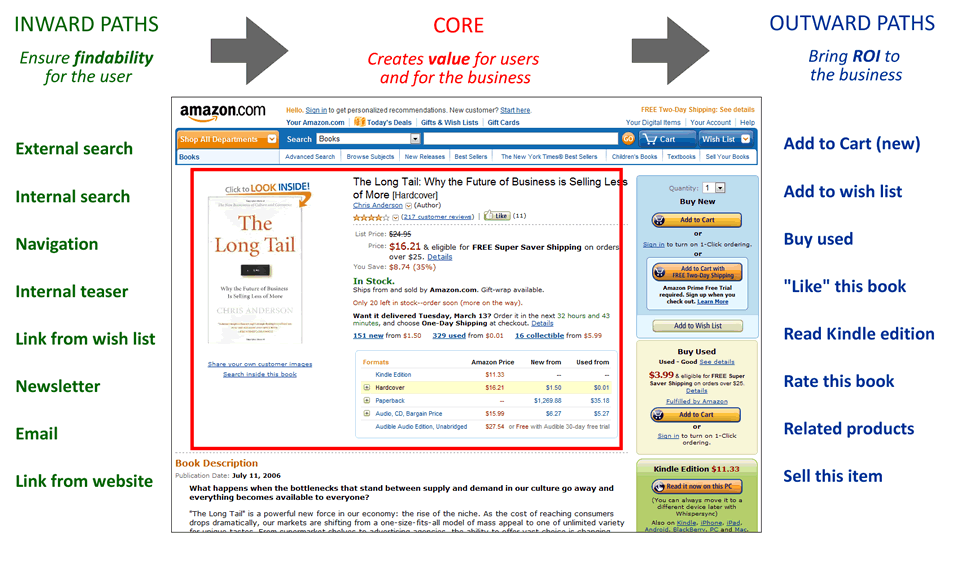
Cores and Paths - desire lines in web design

Cores and Paths is a technique to guide you through the process of creating straight paths to the core offerings on your site.
Conventional web design approach: homepage > navigation > primary content
The Cores and Paths Model: the core content > inward paths > outward paths
The Cores and Paths Definition
  • The Core (and its supporting information): the value creation takes place. Desires for users and goals for the business
  • Inward Paths: ensure findability for the user
  • Outward Paths: bring ROI to the bussiness
The Cores and Paths Process

The Cores and Paths model for www.amazon.com
  1. Define the core (some tips from red routes)
    • Define the core: brainstorm to make a list of possible cores. Decide a core & its supporting information.
    • Represent the core: sketch and focus on the core. Consider interaction & visitors' experiences.
    • Sketch the core in different contexts and devices iteratively (distributable core).
  2. List all possible inward paths
    • Brainstorm inward paths.
    • Write down design requirements for each inward path, which are the actions that must be taken.
  3. List all possible outward paths
    • Write down design requirements for each outward path.
    • Prioritise and rank the outward paths according to business goals.
  4. Put it all together
    • Keep the elements of Cores and Paths in mind.
    • Start looking at the homepage and the navigation. Sketch several alternatives.
    • Get users from the homepage/navigation to the core in the simplest, most-direct way, as well as from the core to the outward paths.
Conclusion
Research on both business and users, PACT > Personas and Scenarios > Brainstorm and define the core, sketch the core in different contexts and on different devices > Inward paths, design requirements > Outward paths, design requirements, rank > Homepage and Navigation lead to the core

(Source: Designing Screens Using Cores and Paths)